Showing posts with label iPhone Apps. Show all posts

Apple TV can run fullscreen iOS Applications - Unofficially

Written By Lingkar Dunia on Saturday, January 7, 2012 | 6:12 AM

Apple TV is one of the low budget Apple iOS device from a company which provides total entertainment to its users. The price of the Apple TV is low as $99.00 contains powerful hardware specification includes Apple A4 chipset with a PowerVR SGX535 and 256 megabytes of RAM, running modified iOS builds from those on iPods touch, iPhone touch, and iPad touch. Apple TV exists as a media center settop box officially but users can also Run any iOS Applications including apps from iPhone, iPod and iPad on jailbroken Apple TV unofficially.
There is one video available on internet which provides you an evidence of running iOS Apps on Apple TV. The video shows demo of some iOS Apps like Facebook, Maps, Safari and YouTube on a jailbroken Apple TV. This is not AirPlay, the apps are running directly from the Apple TV and scaling to 720p. 

According to MacDaddy News, MobileX is a window manager for iOS that replaces Springboard, letting iPhone and iPad apps run on the Apple TV. Since the Apple TV doesn�t have a touch screen, they are using a combination of VNC, SSH and the Apple Remote to launch and navigate apps. Once the app progress finalized by two developers, you will be able to launch apps using only the remote. I think its one of the cheapest way to run iOS Apps directly on $99 Apple TV.

Video Running Full Screen iOS Apps on Apple TV:
6:12 AM | 0 comments

Revenue Sharing Between iOS Apps and Android Apps

Written By Lingkar Dunia on Saturday, December 17, 2011 | 6:25 AM

According to the latest report from Flurry.com about Comparison between iOS Apps and Android Apps Revenue Sharing, it�s revealed that iOS Apps are much profitable in terms of revenue as compare to Android Apps. iOS Apps make four times higher revenue as compare to Android platform. Flurry Analytics has also found that developers are choosing to start new projects on iOS over Android at a ratio of almost 3 to 1. No doubt Android is an open source platform and many big phone maker companies like Samsung, Motorola, Sony etc. is now offering Android devices but the statistic makes it clear that Apple iOS is still more popular platform in terms of Apps Revenue as compare Android platform.

I personally think that Android is new in smartphone arena and it has potential to gain more revenue as compare to any other platform including iOS and its popularity speaks itself that it has already beat its competitors when choosing Smartphones.

Revenue Sharing Between iOS Apps and Android Apps:


6:25 AM | 0 comments

Download Apple iOS 5 for iPhone, iPad & iPod - Direct Download Links

Written By Lingkar Dunia on Saturday, October 15, 2011 | 1:33 AM

Apple has officially released its much awaited iOS 5, the latest and newest version of Apple's Mobile OS for iPhone, iPad, iPod and Apple TV (2nd Generation). Apple has fulfilled its promised which he made to its users regarding iOS 5 with exciting and attracting new features. The latest iOS 5 features includes iMessenger, a regenerated notification system of Mobile OS and other critical updates.

The new iOS 5 also includes the new iCloud feature which supports space up to at least 5GB of storage, through iCloud service users can do many things includes wireless backups and automatic synchronization between your various devices and accessing and syncing photos, music, emails and other media through the cloud. Along with iOS 5, Apple has released several other applications to control your Airport device. In addition to iOS 5, Apple has released a new version of Mac OS X Lion that includes support for iCloud. The new iOS 5 also featuring a slew of new features including deep Twitter integration, a revamped notification system, an updated camera app, a revamped version of Safari and more.


Apple has made the following new changes and updates in its new iOS 5 and have also includes new apps and features:

iOS 5: Notification Center
iOS 5: Lock Screen and Camera
iOS 5: Safari
iOS 5: Gaming
iOS 5: Reminders
iOS 5: Newsstand
iOS 5: iCloud
iOS 5: iMessage
iOS 5: The iPad's magic keyboard

To download the new iOS 5 updates, you need to have a latest version of iTunes 10.5, connect your device, and you will be able to update your device from within iTunes.


Apple iOS 5 Direct Download Links:
1:33 AM | 0 comments

Apple iOS 5.0 and iCloud Details and Features Information

Written By Lingkar Dunia on Saturday, June 11, 2011 | 2:06 AM

Apple has finally announced its upcoming iOS 5.0 firmware version for Mac and iDevices at annual WWDC event. Steve Jobs holds the mike to announce the new flagship of software suites for Mac and iDevices, Apple announced that to date, they have had more than 14 billion downloads, with over 90,000 iPad apps. They have paid developers more than $2.5 billion dollars so far.

Apple started off the new feature list with notifications. Apple has removed the old notification popup system for a more inline notification system, making it less annoying when you're watching a video or playing a game. The 'notification center' will act similar to Android, where your menu swipes down, revealing alerts for all of your phone, messages, emails and more. The notification center is even on your lock screen too.

The lock screen has received a major update, allowing for notifications from apps, messages, and even listening to voice mail without having to slide to unlock the phone.

iOS 5.0 also comes with 'Newsstand', a new subscription-based application that has a ton of newspaper and magazine companies on board, including New York Times, SF Chronicle, Daily Telegraph, and more.


iOS 5 Twitter support
Much rumored beforehand, Apple has introduced Twitter natively into iOS 5, with a 'one click' option for applications to let you use Twitter functionality.

All you'll need to do is sign in through the Settings menu and any app can request integration with your Twitter account, meaning no more constant signing in to every new application you download. It's also fully integrated with the Camera and Photo apps, for example.

You can also tweet articles from Safari and locations from Maps.

iOS 5 Safari
A new reading mode has been introduced in Safari, which removes distraction and provides you with a single, scrolling story. Bye bye, ads! You can now also email the contents of the story as well as the link. There's also a Reading List option so you can save stuff to look at later. We bet Read It Later and Instapaper are well chuffed about that. There's also tabbed browsing and lightning-fast window switching.

iOS 5 Reminders
A reminders feature enables you to store Lists, assign reminders to any dates or even location-specific info. These sync across devices and with iCal.

iOS 5 Camera
There's now a camera button on the lock screen, while you can also use the volume button to take pictures - a great addition. Apple says its camera is one of the most commonly used pieces of hardware on photo-sharing sites like Flickr, and has updated the functionality accordingly.

Photo editing software for easy cropping and enhancement has been added in to iOS 5, and pinching to zoom will zoom in on images when you're trying to take a pic.

iOS 5 Mail
The app now has new elements like draggable addresses so you can pop them across from To to Cc or Bcc.

Flagging and full-searchable messages have been added in too, plus rich text formatting for easier interaction with your e-mails.

A built in dictionary makes it easier to keep your spelling under control, and for the iPad: a split keyboard.

Simply grabbing it with your thumbs and sliding upwards will split it in two, making it easier to tap out emails more speedily.

iOS 5 Game Center
Game Center now lets you browse and download games directly, as well as introducing Achievementpoints, There's also Friend Discovery. Gamer profiles have been updated to include photos as well, plus turn-based gaming is baked right into the application for more responsive gaming.


Last up, Apple introduced iMessage. The new instant messaging service allows any iDevice (iPhone, iPod touch and iPad) to communicate with each other. The new application is very similar to the SMS application, but is completely free. Similar to BBM (BlackBerry Messenger), the application allows you and your friends to instant message one another, from anywhere in the world, without the added roaming charges. iMessage requires WiFi or 3G to send and receive.

iOS 5.0 beta will be made available for the following iDevices:
  • iPhone 4 (GSM and CDMA)
  • iPhone 3GS
  • iPod touch (4th generation)
  • iPod touch (3rd generation)
  • iPad 2 (GSM, CDMA and WiFi)
  • iPad (GSM and WiFi)
  • Apple TV 2G
iOS 5.0 will ship this fall to consumers.
2:06 AM | 0 comments

Decide Whether Your Company Needs Mobile App

Written By Lingkar Dunia on Sunday, June 5, 2011 | 11:05 AM

How to know whether your Company or Business needs a Mobile App of its own?

If you are running any of your business or company and if you are confused whether your company needs an app for more online presence amongst consumers all over the world and you are not taking decision confidently, the answer depends a lot on the kind of company and product or products in play. It also shifts based on the demographic you�re targeting and the current state of the mobile landscape.


Mobile Applications is now one of the fastest way to market any product and services in short time and gain more online presence and customers world wide. If you are a small or medium sized business, and you want to build a Facebook, mobile or web app. You�re undertaking something that�s both simple and ambitious, and you�re probably looking for a bit of help, one thing to consider is the cost. Developing a native app can be expensive, and it may or may not be worth it for your company. And depending on how you handle user data and users� expectations, you might be facing some legal troubles in the future.

Have a look at following Infographic chart which will helps you to decide whether you need an App to market your product and services.
Click to Enlarge Image!
11:05 AM | 0 comments

Download Opera Mini 6 for iPhone and iPad - Free Version

Written By Lingkar Dunia on Sunday, May 29, 2011 | 12:06 AM

The most popular Web Browser for Mobile Devices "Opera" has released its latest Opera version for Apple iPhone and iPad. Now iPhone and iPad users are also able to experience world�s fastest mobile browsing on their smartphones through Opera Mini 6.

Opera Mini 5 were also a huge hit when Opera made its way to the iPhone. Like other Opera Mini version of various smartphones, Opera Mini 6 for iOS not only allows users to access web pages more quickly over slower connections (thanks to data traffic compression), it also has a number of useful features not found in the native iOS browser, Safari. These features include better panning and zooming for viewing sites that don�t have a mobile style sheet, more adaptive rendering to take advantage of the iPhone 4 retina display, and an easy way to share links or pages via Facebook, Twitter or MyOpera.

For Apple iPad users, the browser has been formatted to fit the larger device. Opera Mini 6 has a nice new UI, some enhanced features and best of all, is free. For that reason, it�s worth a download for users looking for something new, especially if you often work in areas with slow data speeds.


You can Download Opera Mini 6 for iPhone and iPad here.
12:06 AM | 0 comments

Play Angry Birds On Web Browsers - PC Version Available Now

Written By Lingkar Dunia on Sunday, May 15, 2011 | 4:23 AM

Finally most popular game ever for mobile devices, Angry Birds is now available for PC's and users now can play Angry Birds Game within their PC's Web Browsers. Today at Google I/O Conference Google has announced the popular bird hurling game, Angry Birds for Chrome Web Store. The browser version of the game is now available and can be played at Chrome Web Store. But you are not limited to play it in just Google Chrome but also you can play it with any of your browser version either Mozilla Firefox or Internet Explorer.

Google have used the popular mobile game Angry Birds to promote their own Web Store for Chrome, the application can be played in Mozilla Firefox and Internet Explorer. If you have yet to play the game that has taken the smartphone and tablet market by storm, you can now get your feet wet by using your browser. Angry Birds has been a massive success, the simple game has become an Internet classic and is among the top selling mobile applications of all time.

The game is available to any modern browser; it may be possible for Google to use the Chrome Web Store to obtain exclusive levels of the popular game explicitly for the Chrome browser. Google is clearly using the popular game to help promote its browser in an attempt to gain market share, but is this game enough to take users away from IE and Firefox.

Wants to play Angry Birds Now, Just Click Here and enjoy it.
4:23 AM | 0 comments

Google Translate App for iPhone With Voice Feature

Written By Lingkar Dunia on Monday, February 28, 2011 | 9:30 AM

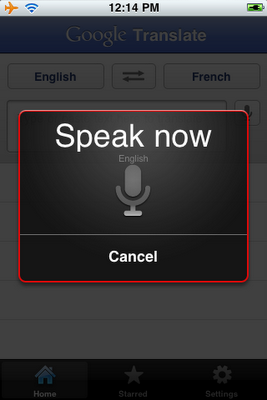
Google has now officialy released the Google Translate App for iPhone, this application is providing a feature with a text to translated text, and voice to text translations.

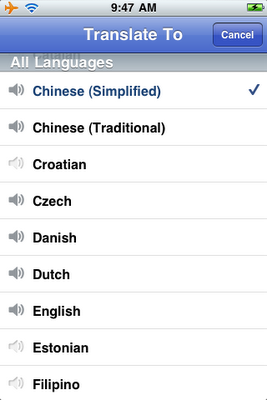
The new application allows for 15 supporters languages to be translated from voice to text. The application works by setting you spoken or written language at the top, and the translated to language next to it. To activate the translation, click on the microphone button beside the text box, and begin speaking.

The voice-to-text translations works for 15 supported languages, including English, French, Chinese, Japanese, Italian and many more. The text-to-text translation comes with over 50 supported languages, allowing you to translate just about any language in the world to your native language.

The application even comes with two handy features, such as full-screen mode, allowing you to magnify your translation to show off to your friends. The second neat feature, is the playback voice button. This feature allows you to play the translation back in any of the 15 supported voice languages.

Download Google Translate App for iPhone free from Apple App Store.


9:30 AM | 0 comments

FaceTime App for Mac Now Available for Video Chat

Written By Lingkar Dunia on Sunday, February 27, 2011 | 2:19 AM

After introducing FaceTime into iPhone and iPod, now Apple comes up with its latest addition of FaceTime into Mac. Apple unveiled that final build of FaceTime in Mac is finally out and Mac owners can now download FaceTime for video chats with their friends.
Apple more said that FaceTime for Mac lets people see video in standard definition or in HD up to 720p resolution. If someone calls a person on the Mac, the computer rings, regardless of whether FaceTime is running or not. In addition, if an Apple account is linked to multiple installations of FaceTime, calls ring on all the computers running the software.

Apple first announced FaceTime for Mac back in October. At that time, the software was in beta process, but now Apple said that FaceTime for Mac is available in its Mac App Store for 99 cents. With the help of the app, those using Mac OS X Snow Leopard can engage in video chats with people using the FaceTime app on the iPhone 4, the latest iPod Touch, and other Macs.

You can get FaceTime App for Mac here.
2:19 AM | 0 comments

Get Amazon Deals Into Your iPhone - A Free iPhone App

Written By Lingkar Dunia on Tuesday, January 11, 2011 | 8:33 AM

Wants to get updates about latest Amazon Deals? Now you can get all Amazon Deals direct into your iPhone, Amazon has finally launched "Amazon Deals", a free iPhone App that provides you an overview of the new and latest daily deals from Amazon.

From this iPhone App, you can monitor deals and even act on them, purchasing items from Amazon directly from your iPhone.

Features include browsing through active deals or upcoming Lightning Deals, setting alarms for individual deals and receiving category-specific notifications (with support for Apple�s push notifications). You can also share deals via e-mail, Twitter, Facebook or SMS.

Amazon seems to be getting serious about offering users a great mobile experience. It has recently launched Price Check, a price comparison app for the iPhone that allows users to easily compare in-store prices with the prices on Amazon.

You can find this Amazon Deals iPhone Application on iTunes or learn more about it over at www.amazon.com/dealsapp.
8:33 AM | 0 comments

Categories

Blog Archives