Showing posts with label Google Voice. Show all posts

Google Voice Search and Google Instant Images Feature Launched

Written By Lingkar Dunia on Wednesday, June 15, 2011 | 8:43 AM

Google has recently launched its new search feature for Google Chrome users called Google Voice Search. Android users are very well aware of voice to enable Google Search feature because its self includes in Android-based Smartphones. According to the Official Google Blog, the company has just today enabled searching using its web site via voice for PC users. This new feature which is exclusively available for Google's own Chrome Web Browser at the moment. Users will be able to see a microphone icon on the Google Search button. Chrome users can simply click on it and speak their search phrase or terms (assuming they have a microphone installed of course). At the moment only English is supported by the new Google Search PC voice feature.

In addition, Google have also introduced another smart feature that debuted on the Android has made its way to the PC desktop. It's the Search Images feature at images.google.com.  By using this feature you can upload an image or even plug in an image URL and then the Search Images features will try to find out things like a location and more. The feature will be available in 40 languages and will be supported by both Chrome and Firefox web browsers via extensions.


Finally Google has announced a new way to speed up searches in general called Instant Images. According to the blog, "Instant Pages can get the top search result ready in the background while you�re choosing which link to click, saving you yet another two to five seconds on typical searches." It will be launched in the next beta version of the Chrome browser or you can try it out now by download the latest version that's made primarily for developers.

8:43 AM | 0 comments

Google Translate App for iPhone With Voice Feature

Written By Lingkar Dunia on Monday, February 28, 2011 | 9:30 AM

Google has now officialy released the Google Translate App for iPhone, this application is providing a feature with a text to translated text, and voice to text translations.

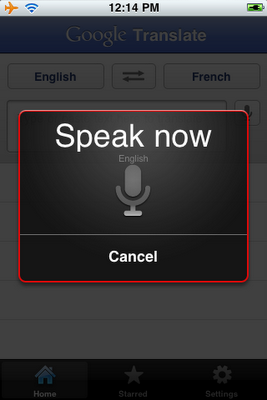
The new application allows for 15 supporters languages to be translated from voice to text. The application works by setting you spoken or written language at the top, and the translated to language next to it. To activate the translation, click on the microphone button beside the text box, and begin speaking.

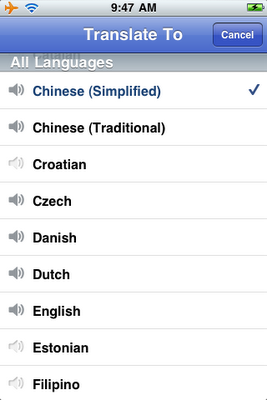
The voice-to-text translations works for 15 supported languages, including English, French, Chinese, Japanese, Italian and many more. The text-to-text translation comes with over 50 supported languages, allowing you to translate just about any language in the world to your native language.

The application even comes with two handy features, such as full-screen mode, allowing you to magnify your translation to show off to your friends. The second neat feature, is the playback voice button. This feature allows you to play the translation back in any of the 15 supported voice languages.

Download Google Translate App for iPhone free from Apple App Store.


9:30 AM | 0 comments

Google Voice 'Number Porting' Feature - Port Your Phone Number

Written By Lingkar Dunia on Friday, January 21, 2011 | 9:21 PM

After introducing Google Voice into iPhone, Google is now comes up with its new Google Voice Number Porting Feature for their users. Google is now currently testing a new feature for Google Voice called 'Number Porting', through which users will get the ability to port their existing landline or cell phone number over to Google Voice.
BGR reports that the new number porting feature is open to a selected number of Google Voice users, but it comes at a price. Google is charging a $20 number transfer fee, payable through Google Checkout. However, there may be other fees for transferring your number over. Your current landline or carrier may charge you an additional early termination fee, which could range in the hundreds of dollars to end a contract.

You can convert your number with a few clicks, you can have people call the regular phone number that you�ve been using all these years, without having to teach them to call a different number just so you can use Google Voice and all its Gmail like features. Simply click on Settings in the top right, then click voice settings, and finally, on the phone tab, click change / port. Click that and you�ll soon be done. Follow the two easy steps and pay the $20 transfer fee, and you'll have all your incoming calls forwarded to Google Voice.

Users with a contract should check with their carrier first, to ensure they aren't going to be nailed with an early termination fee.

Check out this Google Official Video for more information!
9:21 PM | 0 comments

Categories

Blog Archives